API performance monitoring + incident management

See when your API gets slow, not only when it breaks.

For teams that ship APIs. Latency percentiles and request phases from locations around the world, response checks, incidents, on-call and a status page in one product.
Product preview with demo data.
portal.monitoringdog.com
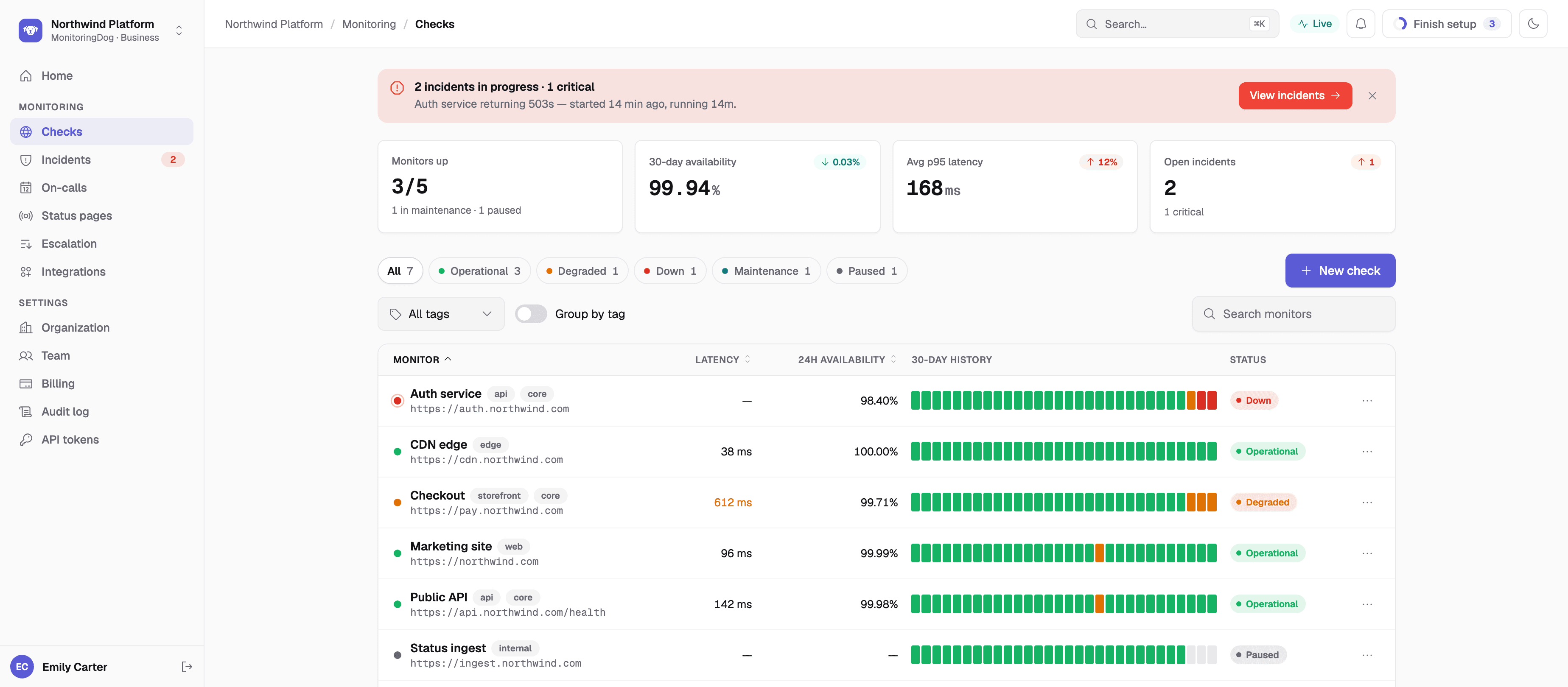
Product preview of the MonitoringDog checks list: each monitor with its status, latency, 24-hour availability and 30-day history, under an open critical incident (demo data)
API performance

Response times, not just status codes.

Every check records how long each request took and where the time went.

See which part of a request got slow

Percentiles show when your API gets slow. Request phases show where the time went.

Percentiles

p50, p75, p95 and p99 response times for every check, on every plan.

Request phases

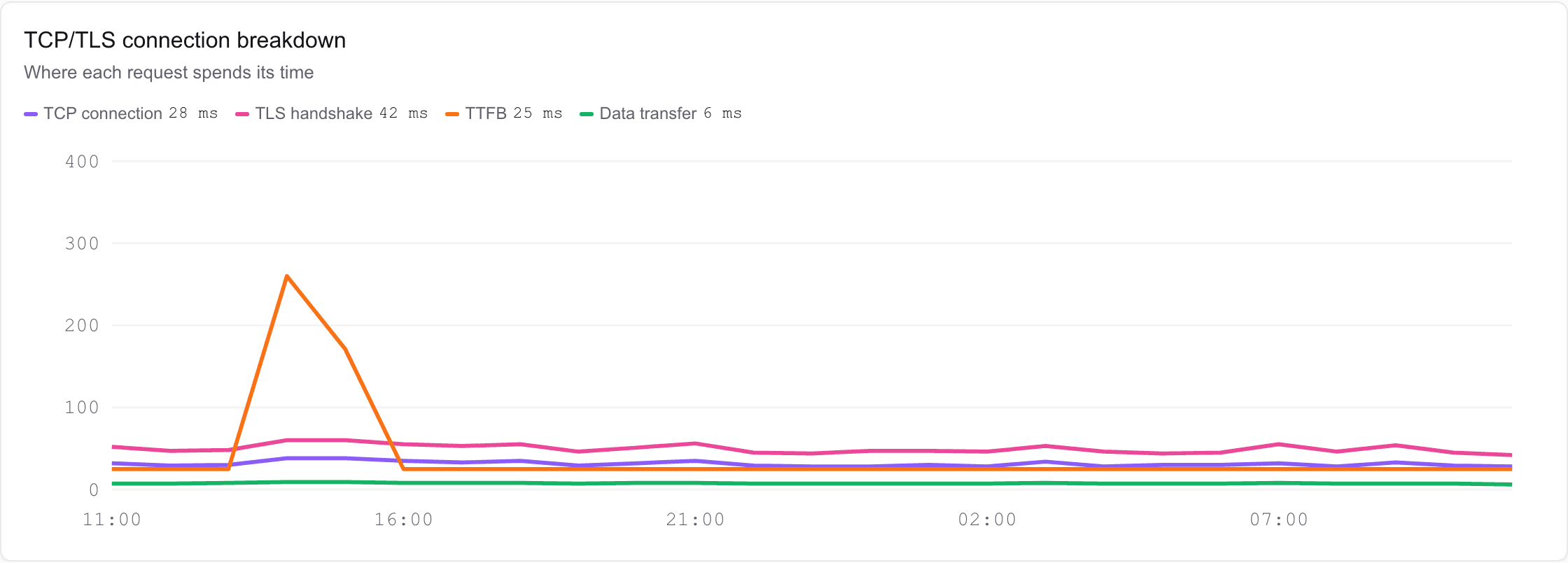
DNS lookup, TCP connection, TLS handshake, time to first byte and data transfer, for each location.

Correct responses

Status-code and keyword checks on every plan. JSON path rules on Team and Business.

Slow-response alerts

On Business, a response slower than your threshold counts as a failure and opens an incident.
Where each request spends its time: TCP connection, TLS handshake, time to first byte and data transfer (demo data)

Product preview with demo data.

Incident management

From failed check to resolved, in one place.

Three screens carry an incident end to end — declare and run it, page everyone on the active shift, and post the update to your status page yourself.

One place to run the incident

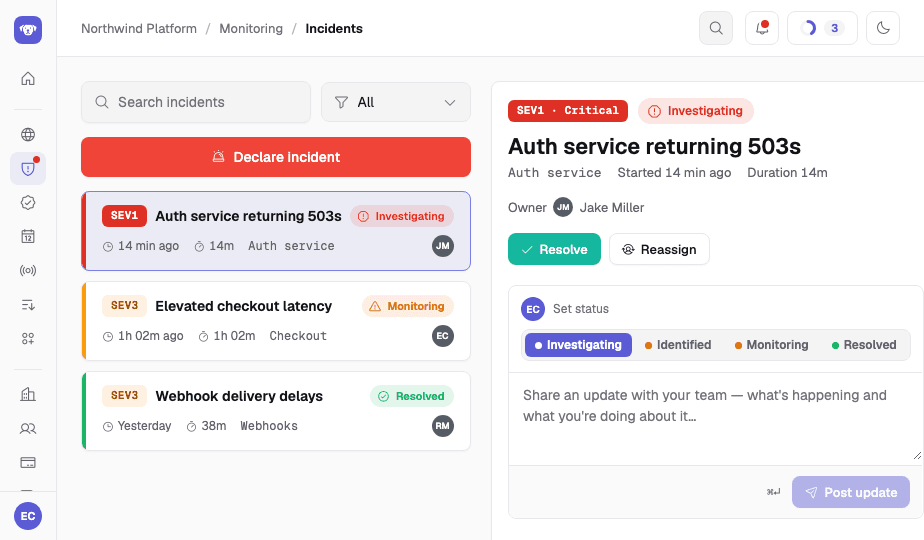
Declare from a short form, then work a live timeline — severity, a status stepper, and comments your team can follow as the incident moves.

Declare with severity

A short form, SEV-1 to SEV-3 — the timeline opens itself.

Status stepper

Investigating → Identified → Monitoring → Resolved, one tap each.

Timeline comments

Log updates as you work the incident, on a timeline your team follows.
Incident detail preview — severity, live status stepper and update composer

Escalation that reaches the right person

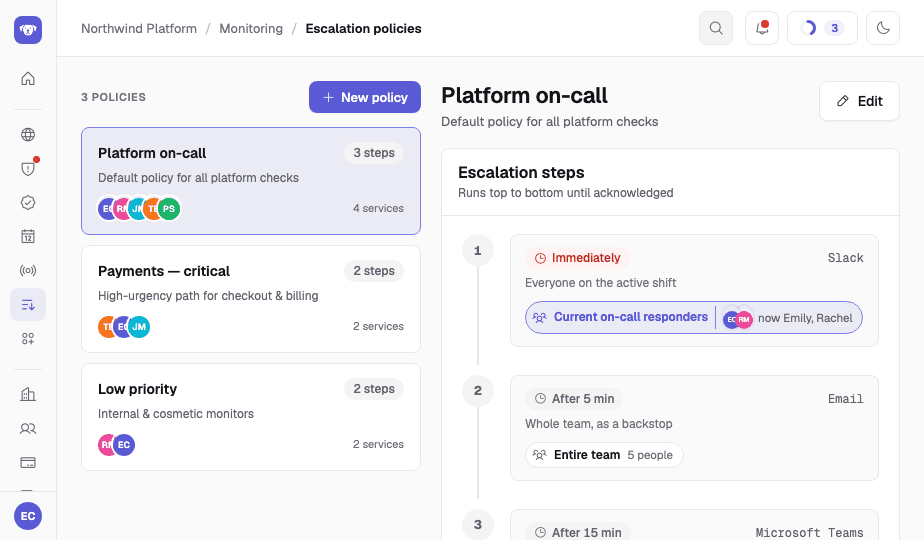
Escalation policies can target whoever's on call, not just named people. Recurring shifts and overrides route every page to everyone on the active shift, together.

Target the on-call shift or people

Pages go to everyone currently on call, the entire team, or specific responders you name.

Recurring shifts & overrides

Follow-the-sun shifts and temporary overrides for 1, 4, 8 or 24 hours.

Tiered follow-through

Immediate → +5 → +15 min, with optional repeats.
Escalation policy preview — tiered steps routing to whoever is on call

Status pages you post yourself

Write an incident or maintenance report — investigating, identified, monitoring, resolved — and publish it straight to your public status page.

Post a status report

Write it once on your status page, and it goes live the moment you hit publish.

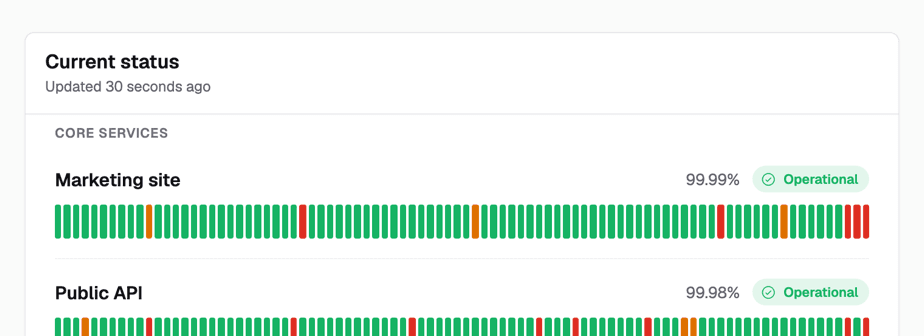
90-day availability, per service

Public timelines your customers can actually see.

RSS feed & status badge

Ships with an RSS feed and an embeddable status badge.
Degraded
Checkout is experiencing elevated latency. All other systems operational.
Public status page preview — service availability timelines beneath a live status banner
SLA compliance

Monthly SLA results for every check.

On the Business plan, set an availability target and latency thresholds for each check, then see how each calendar month went.

Availability and latency targets
An availability target and fixed latency thresholds for each check.
Monthly results
Each calendar month shows whether a check met or breached its targets, decided when the month closes.
CSV and JSON export
Export the monthly results as CSV or JSON.
Monthly SLA results for a check: availability and p95 latency against the targets, met or breached for each calendar month (demo data)

Scroll sideways to see the Met or Breached result for each month.

Product preview with demo data.

Responder app

Incidents in your pocket.

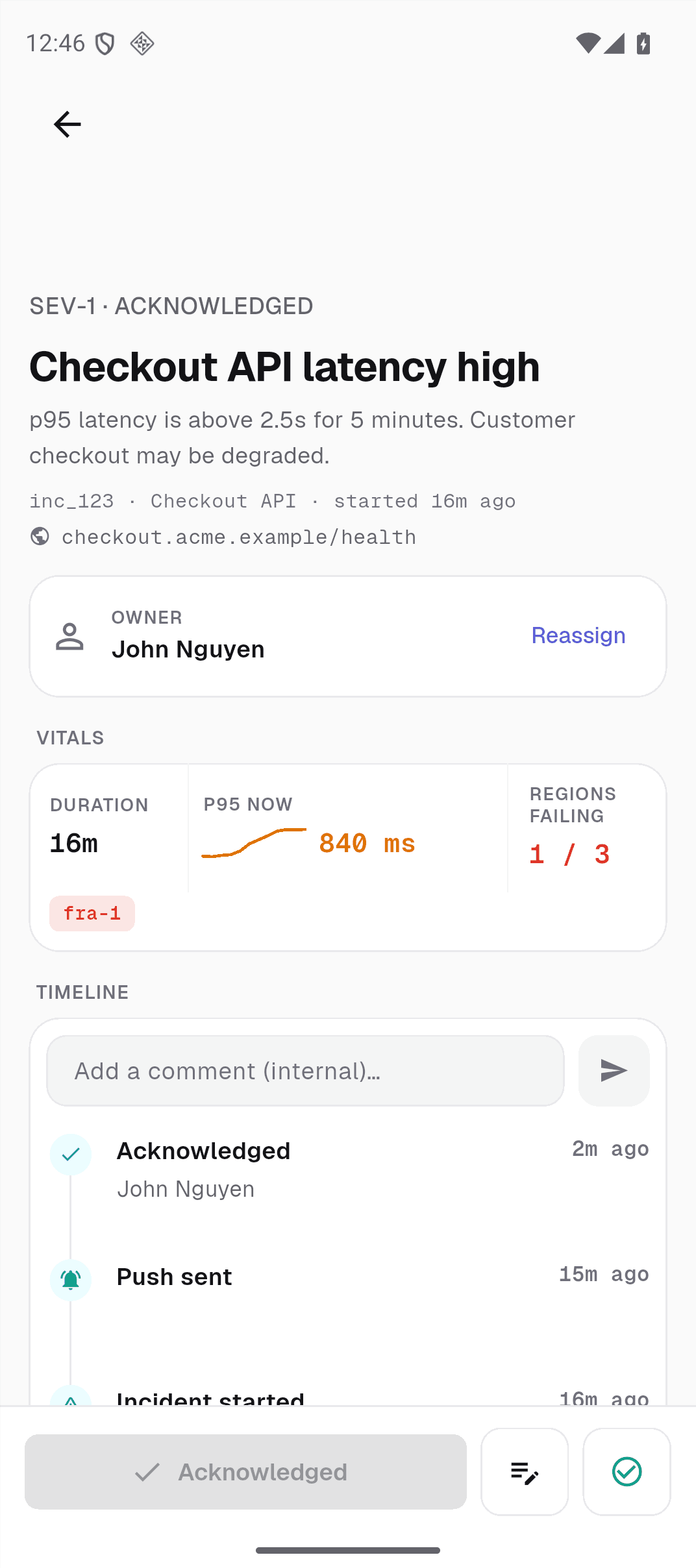
Open the incident from the alert, see who owns it, and acknowledge it in one tap. iOS and Android, in testing; not yet in the App Store or Google Play.

Acknowledge in one tap

Acknowledging stops further escalation, and the incident shows you as its owner.

Update from anywhere

Post an update or reassign the incident to a teammate. Every change is added to the timeline.

Your shifts, on your phone

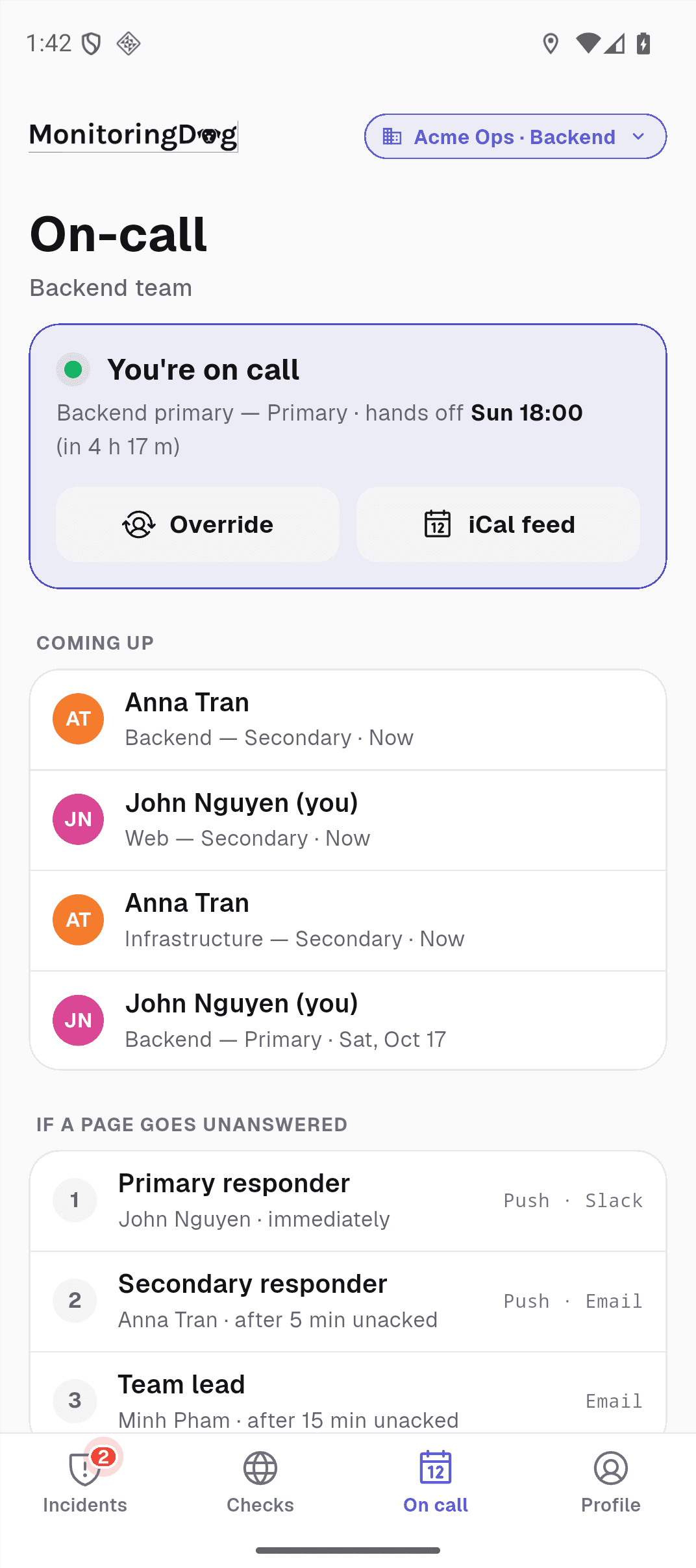
See who is on call and when the shift ends, and create a temporary override for 1, 4, 8 or 24 hours.
Incident detail in the MonitoringDog app: an acknowledged critical incident with its owner, vitals and timeline (demo data)On-call tab in the MonitoringDog app: the current shift, the next shift and the Override button (demo data)

App screens with demo data.

Pricing

Plans built for your whole team's on-call.

Every plan includes a status page; on-call scheduling and escalation policies start on Team.

Free

Start monitoring a project and publish a status page.
$0/mo
  • 5 checks · 60 sec interval · 1 location
  • 1 responder seat · 3 viewers
  • 1 status page
  • 1 integration — email, Slack, Microsoft Teams, Discord or a webhook
  • 30 days of history
Join the waitlist
Recommended

Team

Small-team on-call, escalation and status communication.
$29/mo
$290/yr — 2 months free
  • 25 checks included · 30 sec interval · 5 locations
  • 5 responder seats included
  • Extra: $2 per check · $10 per seat
  • Unlimited viewers · 3 status pages · unlimited integrations
  • On-call scheduling & escalation policies
  • 1 year of history
Join the waitlist

Business

Professional reliability for growing engineering teams.
$99/mo
$990/yr — 2 months free
  • 50 checks included · 15 sec interval · unlimited locations
  • Slow-response alerts: a response slower than your threshold opens an incident
  • Everything in Team
  • 10 responder seats included
  • Extra: $1 per check · $10 per seat
  • Unlimited viewers · 10 status pages · 10 teams
  • SLA target tracking & reports
  • 3 years of history
Join the waitlist

Enterprise

Custom scale and terms for larger organizations.
Custom
  • Unlimited checks, responders, teams & status pages
  • 10 sec interval · unlimited locations
  • Unlimited history retention
  • On-call scheduling & escalation policies
  • Custom contract terms
Book a demo
Get started

Get your first check probing the day you're invited.