Create and Manage API Tokens
Create team or organization API tokens, copy token values, and remove tokens that are no longer needed
Create API tokens when an external system needs to call MonitoringDog APIs, subscribe integrations, or trigger custom incident workflows.
Read API Tokens and Scopes first if you need token ownership, one-time secrets, or expiry behavior.
Before you begin
- Access to the MonitoringDog workspace and team.
- Permission to view or manage API Tokens.
- A secure place to store the token value after creation.
Open API Tokens
Open the MonitoringDog portal and go to the team workspace.
Open API Tokens from the dashboard navigation.
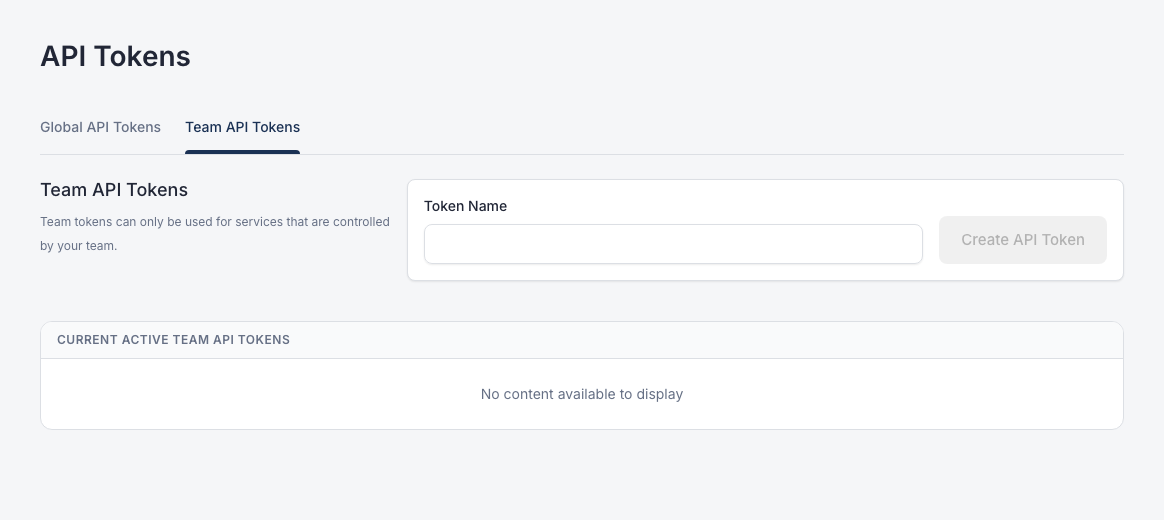
The page has two tabs:
| Tab | Use when |
|---|---|
| Global API Tokens | The token should belong to the organization |
| Team API Tokens | The token should belong to the current team |
Create a team token
Open Team API Tokens.
Enter Token Name.
Click Create API Token.
Copy the token value shown after creation and store it in your secret manager.
Create a global token
Open Global API Tokens.
Enter Token Name.
Click Create API Token.
Copy the token value shown after creation and store it in your secret manager.
Use global tokens with caution because they are shared across the organization.
Delete a token
Find the token in Current Active Team API Tokens or Current Active Global API Tokens.
Open the action menu and click Delete.
Delete tokens when:
- The external system no longer needs access.
- A token may have been exposed.
- You created a replacement token.
- A teammate or integration owner changed.
Rotate a token
Create a new token first.
Update the external system to use the new token.
After the external system works with the new token, delete the old token.
Troubleshooting
| Issue | What to do |
|---|---|
| You lost the token secret | Create a new token and delete the old token |
| An API call is rejected | Check that the token is valid, not expired, and belongs to the required team or organization |
| A Zapier or custom incident flow cannot authenticate | Use a team or organization token that matches the workflow instructions |
| You cannot create or delete tokens | Ask a workspace admin to review your API Tokens permissions |